Working with text lists seems simple at first. Then duplicates start appearing everywhere.
One copied line becomes three. A customer list suddenly repeats names. A file that looked organized yesterday somehow turns messy overnight. It happens quietly, honestly. Most people don’t notice until the list becomes difficult to read.
If you need to remove duplicate lines from a text list efficiently, you don’t always need advanced software or technical skills. In many cases, a few practical methods can clean things up in minutes.
This matters more than people think. Developers deal with duplicate logs, marketers clean email exports, students organize research notes, and office teams sort spreadsheets almost daily. Different workflows, same annoying problem.
What Are Duplicate Lines in a Text List?
Duplicate lines are repeated entries inside a document, spreadsheet, or plain text file. Sometimes they’re exact copies. Other times, they look nearly identical but contain tiny differences like spacing or capitalization.
For example:
- John Smith
- John Smith
- john smith
Depending on the tool, that third line may count as unique. Strange? A little. But that’s how many systems process text.
Most duplicate entries appear after:
- Copy-pasting content repeatedly
- Merging files together
- Exporting database records
- Collecting form submissions
- Collaborative editing
A small example – someone exports customer data twice and combines both files without checking first. Suddenly the contact list doubles in size. It’s surprisingly common, especially in busy workplaces where people move quickly.
And sometimes duplicates are hidden well. A single extra space can trick software into treating two lines differently.
Why Removing Duplicate Lines Matters
At first, duplicate text lines might not seem important. A few repeated entries? No big deal.
But once the file grows larger, those extra lines create confusion fast. Searching becomes slower. Reports become unreliable. Even simple reading gets frustrating after a while.
I once saw a product inventory spreadsheet where one item appeared seven times because different staff members updated the file separately. Nobody noticed for weeks. The numbers looked fine at a glance – until the stock totals stopped matching reality.
Cleaning text lists helps you:
- Improve readability
- Reduce clutter
- Process information faster
- Prevent reporting mistakes
- Keep files manageable
There’s also something mentally satisfying about a clean list. No duplicates. No chaos. Just organized information that behaves properly.
Manual Ways to Remove Duplicate Lines
Not every cleanup task needs automation. Sometimes the simplest approach works perfectly well.
For smaller files, manual methods are often faster than installing new tools or learning scripts.
Using Basic Text Editors
Many text editors let you sort lines alphabetically. Once sorted, repeated entries become much easier to spot.
This works especially well for:
- Notes
- Draft documents
- Small configuration files
- Short research lists
It’s not fancy, obviously. But for quick cleanup? It works.
A student organizing bibliography notes, for example, may only need five minutes and a basic editor to remove repeated references. No complicated workflow required.
Removing Duplicate Lines in Excel
Spreadsheet software makes duplicate removal much easier because the filtering tools are already built in.
Most versions of Excel include a “Remove Duplicates” option. You select the data column, click the feature, and Excel cleans the repeated entries automatically.
It’s especially useful for:
- Email lists
- Customer databases
- Product catalogs
- Survey exports
One thing worth mentioning – always save a backup copy first. Seriously. People accidentally remove valid information all the time because two entries looked similar during cleanup.
And yes, almost everyone learns this lesson once.
Using Notepad++ for Text Deduplication
Notepad++ remains popular for a reason. It’s lightweight, fast, and handles large text files surprisingly well.
You can sort lines, remove duplicate text lines, and process big files without slowing your computer down. Developers often prefer it because it feels simple and direct.
A friend of mine used it to clean thousands of repeated server log entries during a troubleshooting project. What looked impossible at first took less than ten minutes after sorting the file correctly. Small tool, huge time saver.
Best Online Tools to Remove Duplicate Text Lines
Sometimes you just need a quick solution without downloading software. That’s where online duplicate line remover tools help.
You paste your text into a browser window, click a button, and receive a cleaned version almost instantly. Simple. Maybe too simple sometimes.
These tools work well when:
- You switch between devices often
- You need fast cleanup
- You don’t want installations
- The file size is manageable
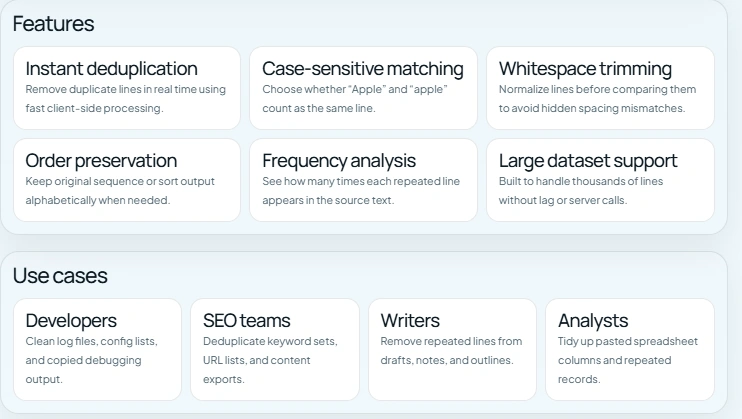
Some platforms also support advanced features like:
- Case-sensitive filtering
- Empty line removal
- Sorting options
- UTF-8 compatibility
- Bulk text cleanup
Still, a small caution here. If the text contains sensitive company information, personal records, or private client data, uploading it online may not be the best idea. Convenience matters, but privacy matters too.
Advanced Methods for Large Text Files
Once text files become very large, manual cleanup stops being practical.
Nobody wants to scroll through fifty thousand lines searching for repeated entries. Well… almost nobody.
Using Command Line Tools
Command-line utilities can remove duplicates extremely quickly, especially on Linux and macOS systems.
Simple commands sort text and filter repeated lines in seconds. Developers and system administrators use these methods regularly because they save time during repetitive maintenance work.
At first glance, terminal commands look intimidating. But many people realize they’re simpler than expected once they try them.
Automating Duplicate Removal With Scripts
If duplicate cleanup is part of your regular workflow, automation can save hours over time.
Python scripts, shell scripts, and small automation tools can scan files, detect repeated entries, and generate clean output automatically. After setup, the process becomes almost effortless.
For example, analysts working with exported sales reports often automate text deduplication because manual cleanup becomes exhausting after a few weeks. Repetition adds up quickly.
And honestly, automation isn’t only for advanced users anymore. Plenty of beginners learn basic scripting through tasks exactly like this.
Tips to Prevent Duplicate Entries in the Future
Removing duplicates helps. Preventing them is even better.
A little structure early on can save a lot of cleanup later.
Use Consistent Formatting
Formatting inconsistencies create hidden duplicates constantly.
For example:
- Apple
- apple
- Apple
Those entries may look similar to humans, but software may treat them differently.
Keeping naming conventions consistent sounds boring, maybe. But it prevents a surprising number of problems.
Validate Imported Data
Imported records often contain overlapping information from older systems or multiple sources.
Before merging files together, scan them first. Even a quick review can catch duplicate entries before they spread across the entire dataset.
One office team I worked with used to merge monthly reports without checking formatting. Every month, duplicates multiplied quietly. By the end of the year, the spreadsheet became almost unusable.
Organize Files Before Merging Lists
Messy file organization creates duplication problems faster than people expect.
Clear file names, organized folders, and simple version control habits reduce confusion immediately. Small habits matter here – maybe more than fancy tools do.
Common Mistakes to Avoid During Text Cleanup
Duplicate removal sounds straightforward, but mistakes happen pretty easily.
Especially when people rush.
Ignoring Case Sensitivity
Some tools treat uppercase and lowercase text as identical. Others don’t.
Always check the settings before deleting entries. Otherwise, important information may disappear accidentally.
Removing Similar but Important Entries
Not every repeated-looking line is a true duplicate.
For example:
- Product A – Red
- Product A – Blue
Deleting one could remove valid inventory information. Tiny differences matter sometimes.
Forgetting to Back Up Original Files
This mistake deserves extra attention because almost everyone experiences it eventually.
Always save an untouched copy before bulk editing large text files. It only takes a few seconds, and it can save hours of recovery work later.
Really. Don’t skip this step.
Frequently Asked Questions
What is the fastest way to remove duplicate lines?
For smaller lists, online tools and spreadsheet software are usually the quickest options. Larger files often work better with command-line methods or automation scripts.
Can I remove duplicate lines online for free?
Yes. Many browser-based text cleaner tools offer free duplicate removal for normal text processing tasks.
Will removing duplicates affect formatting?
Sometimes. Certain tools preserve spacing and formatting better than others, so it’s smart to preview the cleaned output before saving changes.
Are online duplicate remover tools safe?
Trusted platforms are generally safe for regular use. Still, avoid uploading confidential business files or sensitive personal information whenever possible.
What’s the best option for very large text files?
Command-line utilities and automation scripts usually handle large-scale text processing much more efficiently than manual editing tools.
Conclusion
Duplicate entries seem minor at first, but they can create confusion, clutter, and avoidable mistakes surprisingly quickly.
The good news is that cleaning text lists doesn’t need to be complicated. You can remove duplicate lines manually, use spreadsheet features, rely on browser-based tools, or automate the process entirely depending on your workflow.
Start simple if needed. Even basic cleanup habits can improve file organization dramatically over time.
And once you experience the relief of opening a clean, organized list without endless repeated lines… you probably won’t want to go back.