You paste your content into a CMS- and something feels off. The spacing looks strange. A line breaks in the wrong place. Sometimes the whole layout just- refuses to cooperate.
It’s frustrating, right?
In many of these cases, the issue isn’t visible at all. That’s why learning how to remove invisible characters from text before publishing can quietly save you hours (and a bit of sanity too).
What Are Invisible Characters in Text?
Invisible characters are exactly what they sound like-characters you can’t see, but they’re still there, affecting your text behind the scenes.
Most people don’t notice them until something breaks. I remember once copying a paragraph from a clean-looking article… pasted it into WordPress… and suddenly the spacing went wild. No idea why at first. Turned out-it wasn’t the text. It was what I couldn’t see.
Common Types of Invisible Characters
- Zero-width space (ZWSP)
- Non-breaking space (NBSP)
- Hidden Unicode characters
- Extra line breaks or formatting marks
A small example: you copy a sentence, paste it, and it looks normal. But when you try to align it or format it… it behaves differently. Almost like it has a mind of its own (it doesn’t—but it feels like it).
Note to expand: Add before/after visual comparison for clarity.
Why Invisible Characters Cause Problems
At first, it seems like a minor issue. But in real workflows, these tiny characters can create surprisingly big headaches.
Formatting and Display Issues
Text may look fine in one place and break somewhere else. You adjust spacing, fix alignment… and it still doesn’t behave.
I once worked on a blog where a heading refused to center properly. Spent 15 minutes adjusting CSS-only to realize it was a hidden character sitting quietly at the start of the line. One character. That’s it.
SEO and Indexing Concerns
Search engines read your text differently than humans. Invisible characters can split words or slightly alter structure.
It’s subtle. You won’t always notice it-but search engines might.
AI and Content Detection Risks
Some AI-generated text includes hidden markers or formatting. That can confuse detection tools or trigger flags.
Ever seen content that looks perfectly fine but gets flagged anyway? Sometimes, it’s not the content-it’s the hidden layer underneath.
Note to expand: Add a quick case of SEO or publishing issue caused by hidden text.
How Invisible Characters Get Into Your Text
Here’s the honest part-you’re probably not adding them intentionally. They just… come along for the ride.
Copy-Paste From External Sources
Websites, PDFs, Google Docs-these are common sources. Each platform handles formatting differently.
I’ve copied text from a PDF before (looked perfectly clean), but when pasted into an editor, it broke into uneven chunks. Invisible characters again.
AI Writing Tools and Generators
Some AI tools insert hidden Unicode or formatting elements. You won’t see them, but they’re there.
Not always a problem—but sometimes, yes… it creates unexpected issues later.
Messaging Apps and Editors
Content from WhatsApp, Slack, or even emails can carry hidden formatting.
A small example: a client once sent content through email. Looked fine. But when published, spacing was inconsistent everywhere. Guess what? Hidden characters.
Note to expand: Include examples from platforms like LinkedIn or Notion.
How to Detect Invisible Characters
Before fixing anything, you need to confirm what’s actually going on.
Manual Detection Methods
- Paste into a plain text editor
- Use “show formatting” options
These methods help—but not always fully. Some characters still stay hidden (annoyingly so).
Using an Invisible Characters Detector
This is where things get easier.
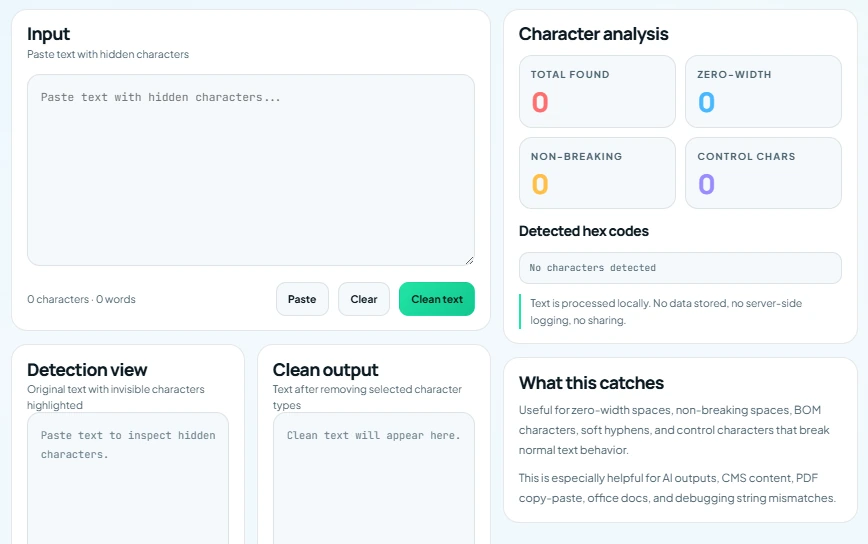
A proper tool highlights hidden characters instantly. No guessing, no second-guessing. You just… see the problem.
Honestly, once you use a tool, going back to manual checking feels unnecessary.
Note to expand: Compare time saved using tools vs manual detection.
How to Remove Invisible Characters From Text
This is the part most people are looking for-and thankfully, it’s simpler than it sounds.
Method 1: Manual Cleaning
You can:
- Re-type sections
- Replace spaces manually
It works. But it’s slow. And easy to miss something (which usually happens at the worst time).
Method 2: Use a Text Cleaner Tool
This is what most people end up using.
Paste your text, clean it, copy it back. Done.
A good invisible characters remover clears hidden formatting, Unicode artifacts, and unwanted spaces in seconds. No extra effort. You can try it now!
Method 3: Use Code or Scripts (Advanced)
If you’re more technical:
- Regex
- Text-processing scripts
This gives more control-but for most users, it’s overkill.
Note to expand: Add comparison table for methods (speed, accuracy, ease).
Best Practices to Clean Text Before Publishing
A little prevention goes a long way.
Always Use Plain Text First
Strip formatting before final edits. Build your content cleanly from the start.
It might feel like an extra step (it kind of is), but it prevents bigger issues later.
Validate Content Before Publishing
A quick check with a cleaner tool-takes seconds. Saves time later.
Think of it like a final polish… just not visible.
Avoid Risky Copy Sources
Be cautious with PDFs, styled websites, and AI-generated outputs.
Not saying avoid them completely-but just be aware.
Note to expand: Convert into a checklist for teams or writers.
When Should You Clean Your Text?
Not just once-make it part of your routine.
- Before publishing blog posts
- Before uploading to CMS (WordPress, etc.)
- Before sending content to clients
I’ve seen teams skip this step and then spend hours fixing layout issues later. A quick clean upfront avoids all that.
Small habit. Big impact.
Note to expand: Add workflow example for agencies or freelancers.
Quick Solution: Use an Invisible Text Cleaner Tool
If you want the simplest way-use a dedicated tool.
Paste your text. Clean it. Copy it back.
That’s it. No complexity, no setup.
(And yes, once you get used to this, you’ll probably do it automatically every time.)
Note to expand: Subtle mention of speed, simplicity, no login benefits.
Final Thoughts
Invisible characters are easy to ignore-because you can’t see them. But their impact? Very real.
They can affect formatting, readability, and sometimes even how your content performs. Fixing them doesn’t need to be complicated though.
Just a quick cleanup step before publishing-and things work the way they should. Smoothly.
If you work with content regularly, it’s worth making this a habit. Try a simple cleaner tool, keep your workflow clean… and avoid those strange, hard-to-explain issues later.
FAQs
What are invisible characters in text?
They’re hidden Unicode or formatting characters that don’t show visually but still affect how your text behaves.
How do invisible characters affect SEO?
They can subtly disrupt structure and keyword formatting, which may affect how search engines interpret your content.
Can I remove invisible characters manually?
Yes-but it’s slower and less reliable. Tools are usually faster and more accurate.
Do AI tools add hidden characters?
Some do. Not always noticeable, but it’s a good idea to clean AI-generated text before publishing.
What’s the fastest way to clean text?
Use an invisible characters remover tool-paste, clean, and copy. Simple.